





Showing posts with label HTML NOTES. Show all posts
Showing posts with label HTML NOTES. Show all posts
How to give Colors to the Text in HTML File?
10/29/10Posted by
Fulto
0 Comments
HTML is a very useful programing language for developing webpages with colorful text.
The following are the steps for giving color to the text of webpages in HTML Program.
The following are the steps for giving color to the text of webpages in HTML Program.

How to create First HTML Program?
Posted by
Fulto
The following are the steps for creating simple html program in Windows operating system.
Step 1: Open notepad
Step 2: Save the file with file extention ".html" or ".htm" for example "aboutme.html" or "aboutme.htm" in your working folder.( e:/html_programs/aboutme.html)
Step 3: Write the following code in the above created notepad file.
<html>
<head>
<title>First HTML Program for displaying MY Details</title>
</head>
<body>
Name: E. Jaya Kumar Reddy<br>
Qualification : M.Tech<br>
Favourite Subjects: JAVA, DBMS
</body>
</html>
Step 4: Save the above code
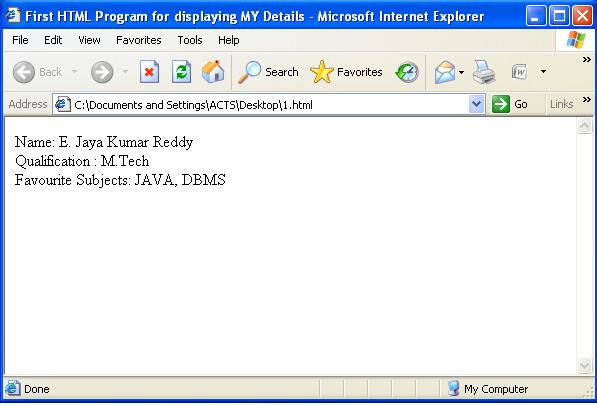
Step 5: Goto the location where u have saved your aboutme.html program and then double click on the file then the following out put will be displayed.

Step 1: Open notepad
Step 2: Save the file with file extention ".html" or ".htm" for example "aboutme.html" or "aboutme.htm" in your working folder.( e:/html_programs/aboutme.html)
Step 3: Write the following code in the above created notepad file.
<html>
<head>
<title>First HTML Program for displaying MY Details</title>
</head>
<body>
Name: E. Jaya Kumar Reddy<br>
Qualification : M.Tech<br>
Favourite Subjects: JAVA, DBMS
</body>
</html>
Step 4: Save the above code
Step 5: Goto the location where u have saved your aboutme.html program and then double click on the file then the following out put will be displayed.
Ask me about your dought by posting question as a Comment?
Subscribe to:
Posts (Atom)